 Copilot Studio - Support and Governance
Migrating a Copilot Studio prototype to a safer environment, with a practical route for external testing.

Migrated a test agent between Power Platform environments and trialled guest and test-account access.
Copilot Studio · Power Platform · Dataverse · Microsoft Entra Guest Access · Responsible AI · Governance
 Copilot Studio
 Power Platform
 Dataverse
 Microsoft Entra
The Problem
I supported a UCL student project team who were developing a Microsoft Copilot Studio agent for an external partner organisation. The immediate challenge was not simply how to build the agent, but how to manage the surrounding platform issues: environments, guest access, authentication, publishing routes, testing and eventual handover.
The agent had originally been built in the default Power Platform environment. This is a common place for non-technical users to begin experimenting, but it is not ideal for a project that needs controlled testing, external feedback or eventual ownership by another organisation. The external partner needed more than a one-off review - they needed to test the agent throughout development, provide feedback on new functionality, and eventually receive a solution that could be owned and supported properly.
That need broke down into three separate questions, which sound similar but are governed by different layers of the Microsoft platform: could the agent be migrated out of the default environment; could external users test the agent during development; and could external users be given editing or ownership rights inside Copilot Studio itself.
Support, Governance and Applying Power Platform Expertise
I used a test agent rather than the student team's live project. I exported it as a Power Platform solution, migrated it into a dedicated sandbox environment, and enabled Dataverse there. I then used test accounts to check guest access, Dataverse permissions, environment roles and Copilot Studio sharing - rather than assuming one setting implied another.
This applied Power Platform environment management skills learnt through the Microsoft Certified: Power Platform Functional Consultant Associate (PL-200) course - importing and exporting agents as solutions, and managing environments - to a guest-access and governance question rather than a typical app build.
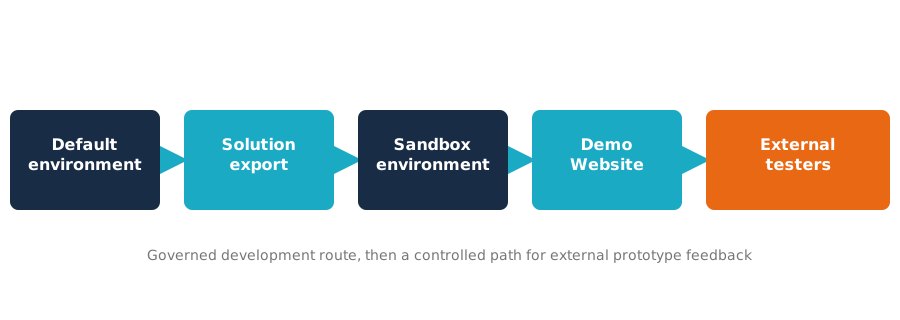
The tested route: development migrated out of the default environment, then a controlled path for external prototype feedback.
Sandbox Testing
Migrating the agent into a dedicated sandbox was the right governance step, but not a complete access solution. I confirmed the agent could be migrated out of the default environment using a Power Platform solution, and that a guest user could be added to the tenant and access parts of the underlying Power Platform and Dataverse environment once guest access was configured correctly.
That did not translate into reliable Copilot Studio authoring access. This was the key finding: "the user is a guest in the tenant", "the user can access Dataverse", "the user has environment roles", "the agent has been shared", and "the user can edit the agent in Copilot Studio" are separate claims - one does not automatically imply the next. That distinction shaped the final recommendation: external partner users should not be treated as Copilot Studio co-editors unless a more formal account, licensing and tenant arrangement is put in place.
External testing workaround
I then explored a route for external prototype testing. By changing the agent authentication setting to No authentication, publishing the agent, and enabling the Demo Website channel, I was able to create a shareable test link. This gives external stakeholders a way to interact with the agent and provide feedback without needing access to the Copilot Studio editor.
This route is useful for prototype testing, but it has an important limitation: the Demo Website is unlisted, but it is not private - anyone with the link can access it. I documented it as a testing workaround for low-risk prototype content, not as a secure production deployment model.
Tools
Microsoft Copilot Studio Power Platform Admin Centre Dataverse Microsoft Entra guest access Power Platform solutions Demo Website channel Authentication settings Sandbox environments
Recommendation and Outcome
My recommendation separated the project into three stages: migrate agent development into a dedicated environment rather than continuing in the default one; use a Demo Website link for low-risk external prototype testing, provided the team understands that anyone with the link can access it; and treat final ownership and editing rights as a separate handover question, likely needing a more formal tenant and licensing arrangement.
The work turned a vague access problem into a clearer set of options: a safer route for migrating the agent out of the default environment, a practical way to support external feedback, and a clearer line between end-user testing and Copilot Studio authoring access.
Illustrative Copilot agent configuration view. No student, partner or tenant-identifying details are shown from the project itself.
What This Demonstrates
- Diagnosing a multi-layer Microsoft access issue across Copilot Studio, Power Platform, Dataverse and Microsoft Entra
- Creating a safe test case before making recommendations about a live student project
- Migrating a Copilot Studio agent between environments using Power Platform solution export and import
- Distinguishing between environment access, Dataverse access, agent sharing, authoring access and published channel access
- Testing guest access using a realistic external account rather than relying on assumptions
- Finding a workable Demo Website route for low-risk prototype feedback, with a clear warning about its access model
- Advising non-technical builders without taking ownership away from them
This case study reflects the kind of practical AI governance work that sits between learning technology, platform administration and responsible innovation: making new tools usable without ignoring the boundaries that keep them safe.
Skills demonstrated
Responsible AI governance
Copilot Studio administration
Power Platform environment management
Dataverse and guest access testing
Microsoft Entra guest identity
Stakeholder advising