Reusable Moodle Learning Design System
A consistent set of patterns, templates and design rules for building structured, accessible online learning activities - developed through repeated module builds at UCL STEaPP from 2024 to 2026.
Moodle · Moodle Books · Pages · Forums · Databases · HTML/CSS · Accessibility · WCAG 2.2 AA · UCL STEaPP · Online Learning Design
1. Project Context
Online course pages can become inconsistent, dense and difficult for students to navigate when each activity is built in a different style. Academic content often arrives as documents, outlines, recordings or rough plans - it needs to be converted into clear, accessible, structured Moodle activities before it becomes a workable learning experience.
Through repeated module builds at UCL STEaPP - for the Online MSc and related programmes from 2024 to 2026 - I developed and refined a consistent approach to Moodle activity design. This is an internal working system, not a commercially released product. It represents the practical design decisions, patterns and standards that make my Moodle work consistent, accessible and easier to maintain.
Internally, aspects of this system have working names ("Operation Sausage", "Braf"). Publicly, the clearest description is a reusable Moodle learning design system: a set of repeatable patterns for building structured, accessible online learning.
2. Problem and Need
Without a consistent design approach, Moodle course pages built by different people - or by the same person across different modules - can vary significantly in structure, visual presentation and instructional clarity. Students encounter pages with different layouts, inconsistent headings, unclear instructions and unpredictable activity structures.
For a fully asynchronous online programme - where there is no synchronous session to clarify confusion - this inconsistency has a direct impact on the learner experience. Students need to be able to:
- Understand immediately what an activity is asking them to do
- Know why a reading, video or task is relevant before they engage with it
- Recognise recurring activity types so they can focus on content, not navigation
- Know what to produce and how to contribute to peer interaction
- Transition clearly from one activity to the next
The specific design problem was: how to build a repeatable way to convert complex academic material into structured, accessible, learner-facing Moodle activities - without every module becoming a bespoke one-off build.
What the design system needs to solve
- Turn dense academic content into manageable stages
- Give students context before asking them to act
- Signal activity purpose visually and textually
- Support note-taking and reflection as standard, not optional extras
- Structure peer interaction so it has clear purpose and guidance
- Apply accessible HTML consistently across all activity types
- Allow academic staff to update content without breaking the design
3. My Role
I designed, developed and applied this learning design system through my work as Learning Technologist at UCL STEaPP. My role was to act as the learning design and technical implementation lead - taking academic content and building it into accessible, structured Moodle activities. The system emerged from practice: building the same types of activities repeatedly, refining what worked, and codifying the patterns that produced clearer, more consistent, more accessible results.
This is not a top-down design framework imposed on academic staff. It is a practical set of working standards that I apply, adapt and document as part of the production process for each module. It also supports academic staff by giving them clear, reusable templates for common activity types, reducing the effort needed to produce well-structured content.
4. Tools and Platforms
Moodle LMS (UCL instance) Moodle Books Moodle Pages Moodle Forums Moodle Databases Moodle Quizzes HTML/CSS within Moodle editor Panopto (video) Padlet Mentimeter Mahara (e-portfolio) WCAG 2.2 AA accessibility checking Moodle Ally Moodle accessibility checker
5. What Was Built: Design Principles and Patterns
The design system is built around a set of principles that guide every activity build. The core idea is a repeating learning rhythm: context → stimulus → guided note-taking → structured contribution → peer interaction → reflection → transition. Not every activity includes all of these steps, but the same underlying structure makes activities recognisable and navigable.
Instructional design principles
- Context before action: every activity starts with a clear explanation of what students are doing and why it matters
- Make Notes prompts: a consistent note-taking step before discussions, assessments or peer contributions - giving students preparation time rather than expecting unstructured response
- Structured peer interaction: forum and database tasks include explicit guidance on what to contribute, what a useful response looks like, and how to engage with peers' contributions
- Up Next transitions: short connecting text between activities explains what comes next and how the current activity has prepared students for it
- Learning outcomes at activity level: each Book chapter or Page activity states what students will be able to do or understand after completing it
- Activity sequencing: reading → note-taking → contribution → peer interaction reflects a deliberate learning arc, not just a content list
Visual and accessibility design principles
- Consistent iconography: recurring icons for reading, note-taking, peer sharing, feedback, quizzes and tasks - same meaning, same icon, every module
- Decorative icons: icons used for visual rhythm are marked as decorative (empty alt text) so screen readers do not narrate them unnecessarily
- Content image alt text: images that convey learning content have meaningful, educationally relevant alt text - not file names or generic labels
- Restrained layout: consistent spacing, clear heading hierarchy, manageable content chunks - avoiding visual noise or competing elements
- WCAG 2.2 AA compliance: colour contrast, semantic HTML structure, keyboard navigability and accessible form design applied throughout
- Accordion use: complex multi-part content uses accordions to reduce visual density without hiding essential material
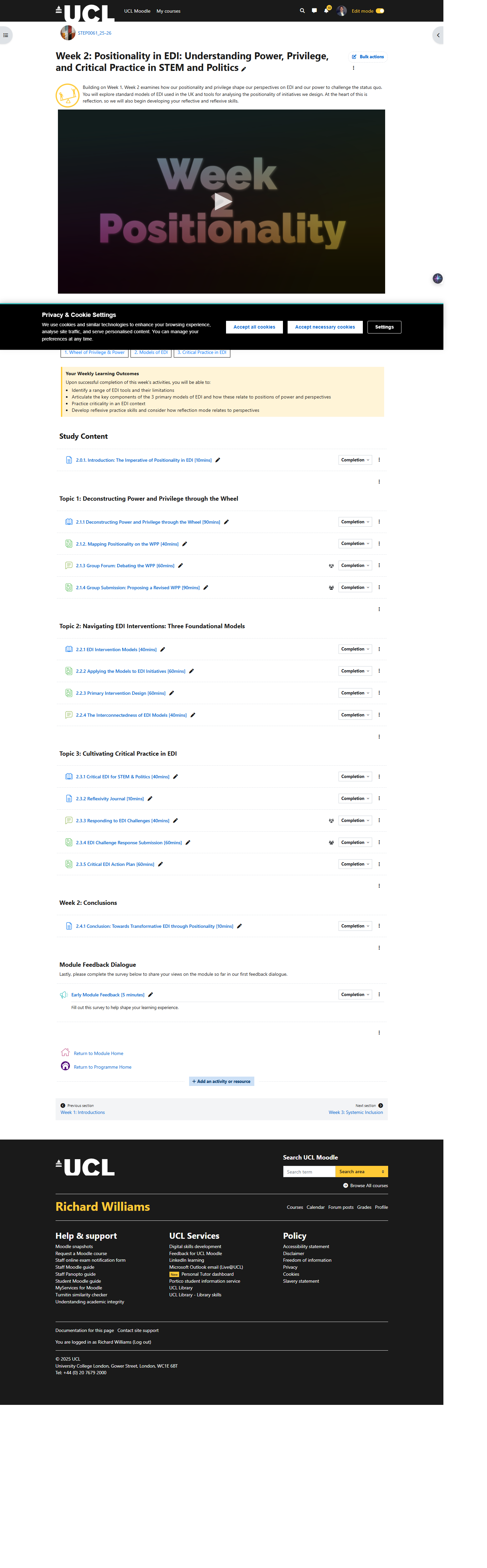
Consistent layout applied across STEaPP Online MSc modules - structure makes navigation predictable and reduces cognitive load.
Activity Type Patterns
The design system includes specific reusable patterns for each Moodle activity type commonly used in the STEaPP Online MSc.
Moodle Books
Used for structured multi-part content. Each Book follows a consistent chapter pattern: learning outcomes, content sections, embedded questions and a chapter-end "Make Notes" prompt. Books are used where content needs to be read across multiple stages before students contribute.
Moodle Pages
Used for single-topic introductions, video-based activities and task-setting. Page activities follow a consistent structure: brief context, the resource (video, reading or task description), a note-taking prompt, and a transition to the next activity.
Moodle Forums
Used for structured asynchronous discussion. Forum instructions are written in a consistent format: what to post, what length or depth is appropriate, how to engage with peers' contributions, and what the purpose of the discussion is within the wider module. Unstructured "discuss this topic" prompts are replaced with specific, scaffolded questions and contribution guidance.
Moodle Databases
Used for peer contribution and feedback tasks. Database activities include clear contribution instructions, a worked example of the kind of submission expected, and guidance on peer review - what a useful, constructive response to a peer's work looks like.
Moodle Quizzes
Used for knowledge checks and formative assessment. Quiz activities are designed with consistent instructions and, where appropriate, explanatory feedback on answer options - so the quiz functions as a learning activity rather than just a test.
Linked activity sequences
Some learning sequences link multiple activity types - for example: introduction Page → reading Book → Make Notes prompt → group Forum → peer Database contribution → individual reflection Forum. The design system includes patterns for these linked sequences, ensuring the transitions between activities are clear and the purpose of each step is explained.
6. Stakeholders
Academic Staff
Module leads who provide content - the design system translates their teaching intentions into structured Moodle activities.
Programme Teams
Responsible for overall programme coherence - the design system ensures consistency across modules.
Students
Online postgraduate learners who benefit directly from clearer instructions, predictable structure and accessible content.
Digital Education Team
Colleagues working on Moodle and online provision who benefit from documented, consistent patterns.
7. Evidence and Artefacts
Evidence for this case study includes screenshots and examples drawn from the module development work at UCL STEaPP. Where screenshots include learner-visible content, they are drawn from course-design views rather than live learner data. The case study for UCL STEaPP Module Development provides specific examples of the design system applied to STEP0024 Science Funding and Governance and the Communicating Science for Policy module.
- Screenshots of Moodle Book chapters with consistent structure, learning outcomes and note prompts
- Examples of forum task instructions following the design system pattern
- Examples of database contribution and peer feedback activities
- Before/after comparison: raw academic content plan compared to structured Moodle activity
- Accessibility checking evidence: contrast ratios, alt text, heading structure
Screenshots to be added. Please provide examples from STEP0024, Science Communication or other STEaPP modules - particularly any before/after examples showing a raw module plan becoming a structured Moodle Book chapter or forum activity.
8. Outcome and Impact
The design system has been applied across 12 or more online modules in the STEaPP Online MSc, providing a consistent visual and instructional structure that reduces the cognitive load of navigating unfamiliar online content. Student feedback on the first cohort (2025–26) indicated that 100% understood the purpose and content structure, and 96.7% agreed the format was suitable for their learning - figures reported in the co-authored conference paper presented at CODE/RIDE in March 2026.
The system has also reduced the time required to build new activities from scratch, because reusable patterns can be applied and adapted rather than rebuilt for each module. This makes the work more maintainable and easier to hand over.
"The value of the system is not just visual consistency. It provides a repeatable learning rhythm - context, stimulus, guided note-taking, structured contribution, peer interaction and reflection - that helps students understand how to study online and reduces the friction of inconsistent page design."
9. Reflection and Learning
The most important lesson from developing this system is that good online learning design is mostly invisible to students. When it works well, students simply know what to do, can navigate the course without confusion, and focus their attention on the content rather than on working out how the platform is structured. The design system succeeds when students do not notice it.
A secondary lesson is about sustainability. A beautifully designed one-off module that no-one else can maintain is a liability rather than an asset. The reusable pattern approach makes it easier for colleagues to pick up, maintain or extend a module after handover - because the structure is documented and consistent rather than idiosyncratic.
The visual and accessibility dimension of the system reinforced an important principle: decorative elements must genuinely be marked as decorative, not left with vague labels or file names as alt text. Every visual element in a Moodle course should either communicate something useful or communicate nothing - there is no acceptable middle ground between meaningful and empty alt text in accessible design.
Related work
Skills demonstrated
Online learning design Moodle activity development Accessible HTML/CSS WCAG 2.2 AA Instructional sequencing Academic content transformation Cognitive load reduction Design system thinking