UCL STEaPP Moodle Engagement Tracker

A bespoke monitoring and evaluation system combining automated Moodle scraping, Dataverse, Power Apps and Power BI to make learner engagement visible and actionable.
VS Code showing the UCL activity tracker project structure with PowerShell scripts, Selenium tools and config files

PowerShell · Selenium · Dataverse · Power BI · Power Apps (Model-Driven) · SharePoint · Power Platform · Moodle API · UCL STEaPP

Spring 2026 Built Term 3, 2025–26 academic year
9+ tables Dataverse model - modules, activities, learners, enrolments, completions, last access, scrape runs and logs
PowerShell + Selenium Scrape pipeline, ~20–30 min run time
Power BI Refreshable stakeholder-facing engagement dashboard

My Role

I designed and built this system end-to-end. This included: scoping the problem with programme teams; designing the Dataverse entity model; writing the PowerShell and Selenium-based scraping scripts; building and configuring the model-driven Power App admin interface; developing the Power BI dashboard measures, visuals and filters; investigating and resolving data quality issues (including suspended learner handling and learner-count discrepancies); configuring SharePoint and Power BI access permissions; and writing the full system documentation and maintenance guide.

The work was carried out with IT awareness and approval of the Selenium-based approach at UCL, where direct Moodle API access is restricted to the central IT team. Programme team stakeholders provided requirements, reviewed dashboards and validated the data - all build and technical decisions were mine.

Project Overview

Built in Term 3 of the 2025–26 academic year (Spring 2026), this project replaced a manual activity tracking process at UCL STEaPP that relied on separate data sources - Microsoft Lists and Moodle reports managed module by module. That approach could not scale to cover a growing portfolio of online MSc modules without significant manual overhead, and the data it produced was fragmented across sources that did not speak to each other.

This project replaces that fragmented approach with a structured reporting pipeline: PowerShell scripts scrape Moodle, data is stored in Dataverse, a model-driven Power App provides an administrative interface, and Power BI presents the reporting layer to programme teams, module administrators and wider staff.

The goal is not simply to collect data, but to make it usable - giving staff a clearer, more actionable view of learner access, activity completion, module participation and potential support needs, without requiring them to manually extract and reconcile Moodle reports.

System Architecture

The pipeline runs end-to-end from Moodle to a stakeholder-facing dashboard:

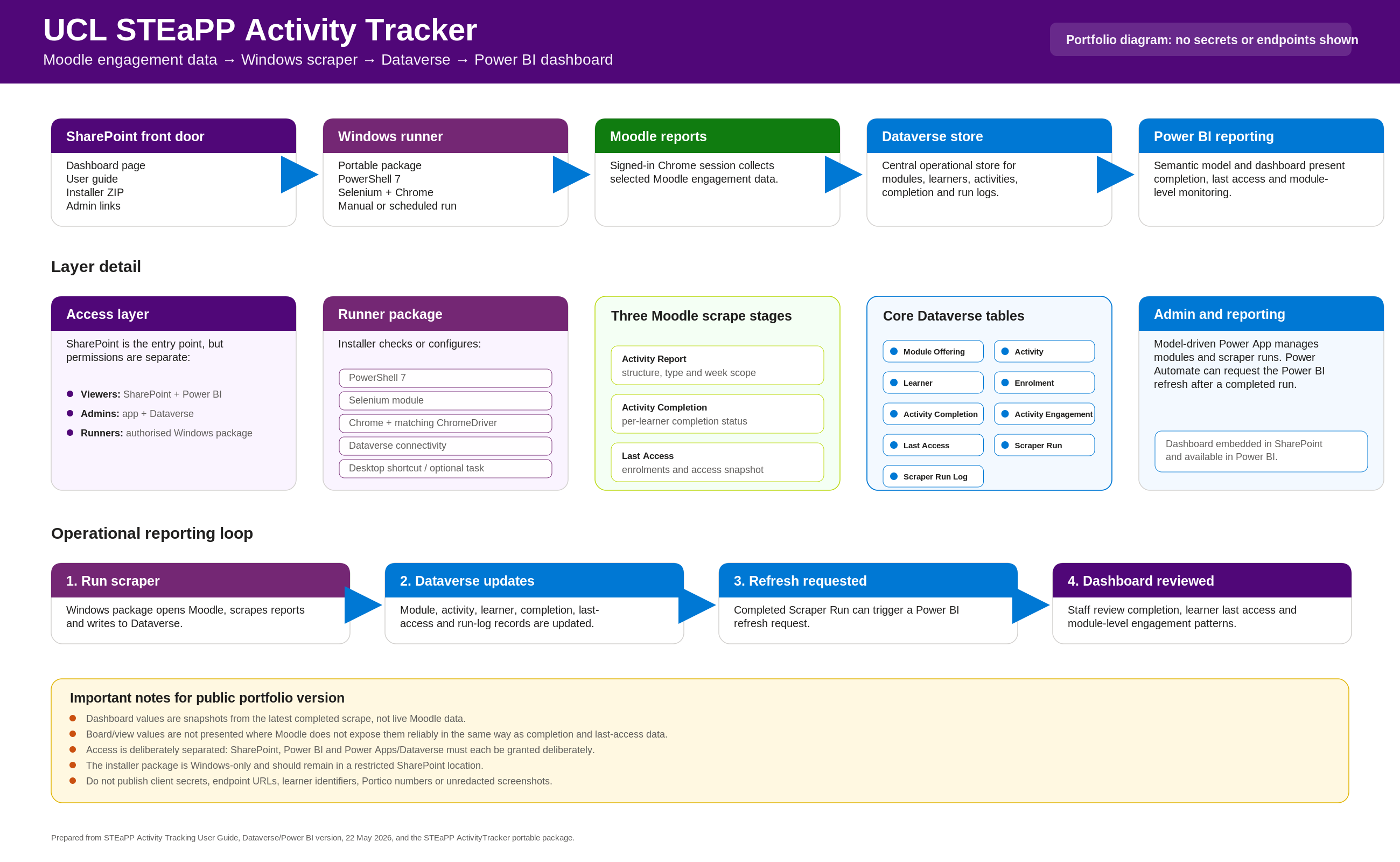
UCL Moodle → PowerShell Scrapers → Dataverse Tables → Power BI Dashboard → SharePoint / Power App Access

Moodle data is extracted by local PowerShell scripts with Selenium-based web automation. Data is written into Dataverse, where it can be managed consistently across academic years, terms and modules. Power BI reads from Dataverse to provide a stable, refreshable dashboard. A model-driven Power App provides an administrative interface for managing module offerings, active modules and related data.

UCL STEaPP Activity Tracker system architecture diagram - Moodle scraping pipeline through Dataverse to Power BI and SharePoint

End-to-end pipeline: Moodle scraping - Dataverse storage - Power BI reporting - SharePoint and Power App access.

Power Platform Dashboard
Activity Tracker Power Platform dashboard showing the model-driven admin interface with module configuration and learner engagement data

The Activity Tracker Power Platform dashboard - module management, active scrape scope and engagement metrics in one interface.

What the System Tracks

At module level: course metadata, academic year/term grouping, activity types (Page, Forum, Quiz, Database, Board), completion percentages, and whether the module is currently in the active scrape scope.

At learner level: name and enrolment status, last access date and time, per-activity completion records, and a calculated completion percentage. Suspended learners are handled separately - retained in the model for audit purposes but excluded from active headcounts.

Note: Some Moodle activity types (particularly Boards) do not expose view-count data. The system distinguishes clearly between collected, calculated, and unavailable fields.

Dataverse Data Model

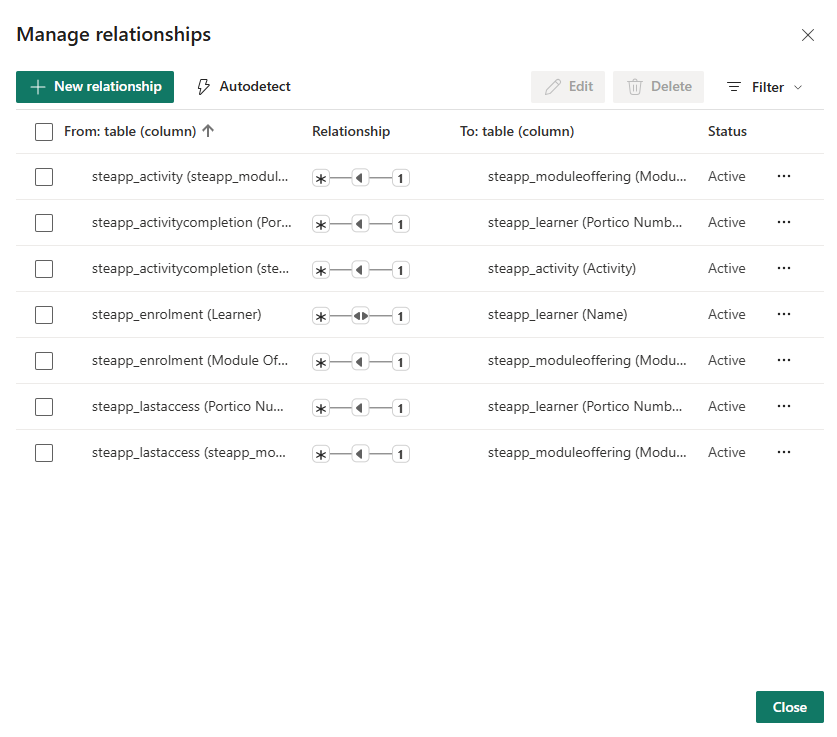
Power BI manage relationships dialog showing active entity relationships between steapp_activity, steapp_activitycompletion, steapp_enrolment, steapp_learner, steapp_lastaccess and steapp_moduleoffering tables

Seven active relationships linking activities, completions, enrolments, learners, last access and module offerings.

Instead of new spreadsheets or Lists for each academic year or module, the Dataverse model uses a consistent entity set - Academic Year, Term, Module Offering, Learner, Enrolment, Moodle Activity, Scrape Run, Activity Completion, Last Access Snapshot. Each new year or term becomes new data in the same model, not a new data source. That is what makes it genuinely scalable.
Scraping Infrastructure

Moodle data is extracted using PowerShell scripts with Selenium-based web automation. This approach was developed with UCL IT awareness and approval as a practical alternative where direct Moodle API token access was not available to departmental staff - API access via web-token is restricted to the central IT team. Two main scrape pipelines are in operation:

Last Access Scrape

Gathers learner access data from Moodle participant pages across configured modules. Typical run time: 10–15 minutes. Provides the last access date and time for each enrolled learner, allowing programme teams to identify learners who have not engaged recently.

Activity Completion Scrape

Gathers activity completion data across all configured modules, recording which activities each learner has completed and the completion status of each. Typical run time: 20–30 minutes. This is the main source for the completion percentage metrics in the dashboard.

Power Automate - Nested Loop Pipeline
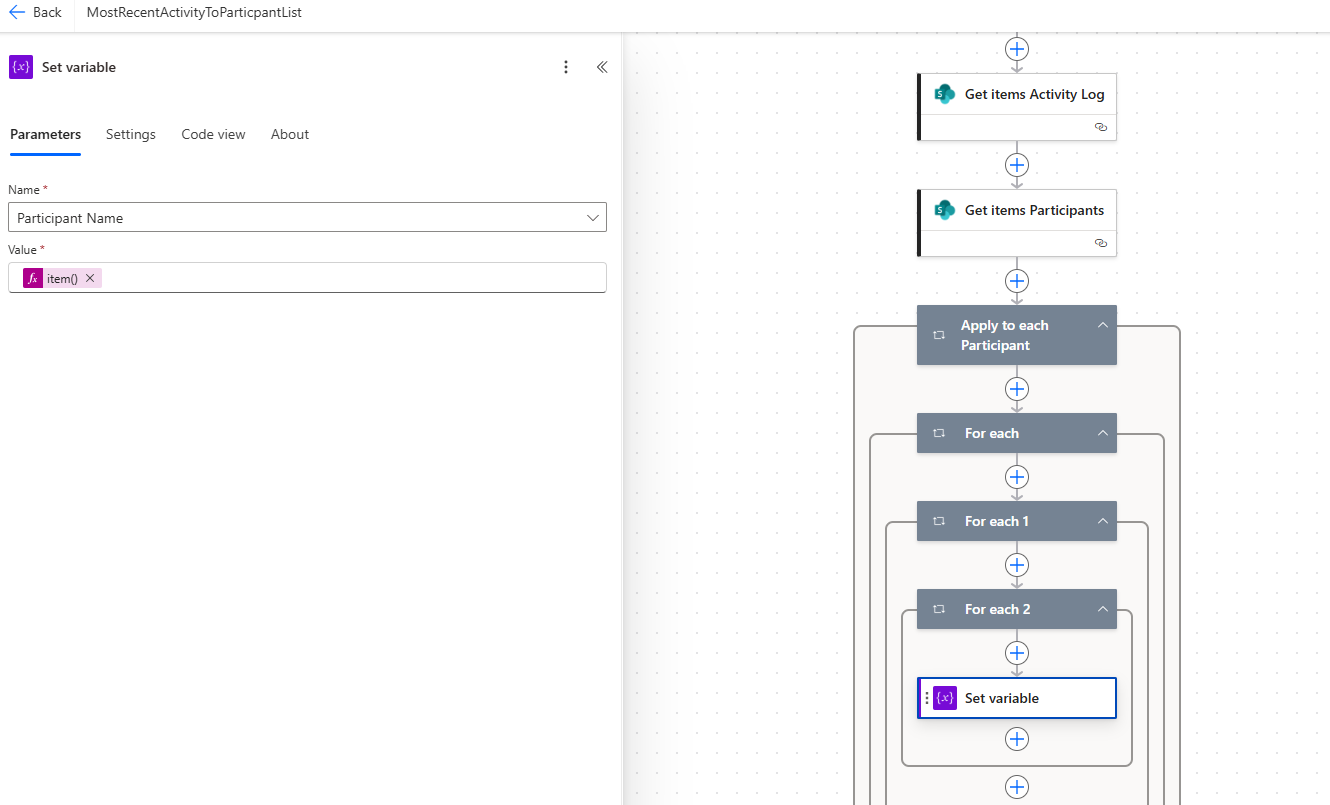
Power Automate flow showing nested For each loops processing activity log and participant data with Set variable and Apply to each steps

The MostRecentActivityToParticipantList flow - nested loops across activity log and participant records, pulling data from SharePoint into the tracking pipeline.

Power Automate - Filter & Compose Operations
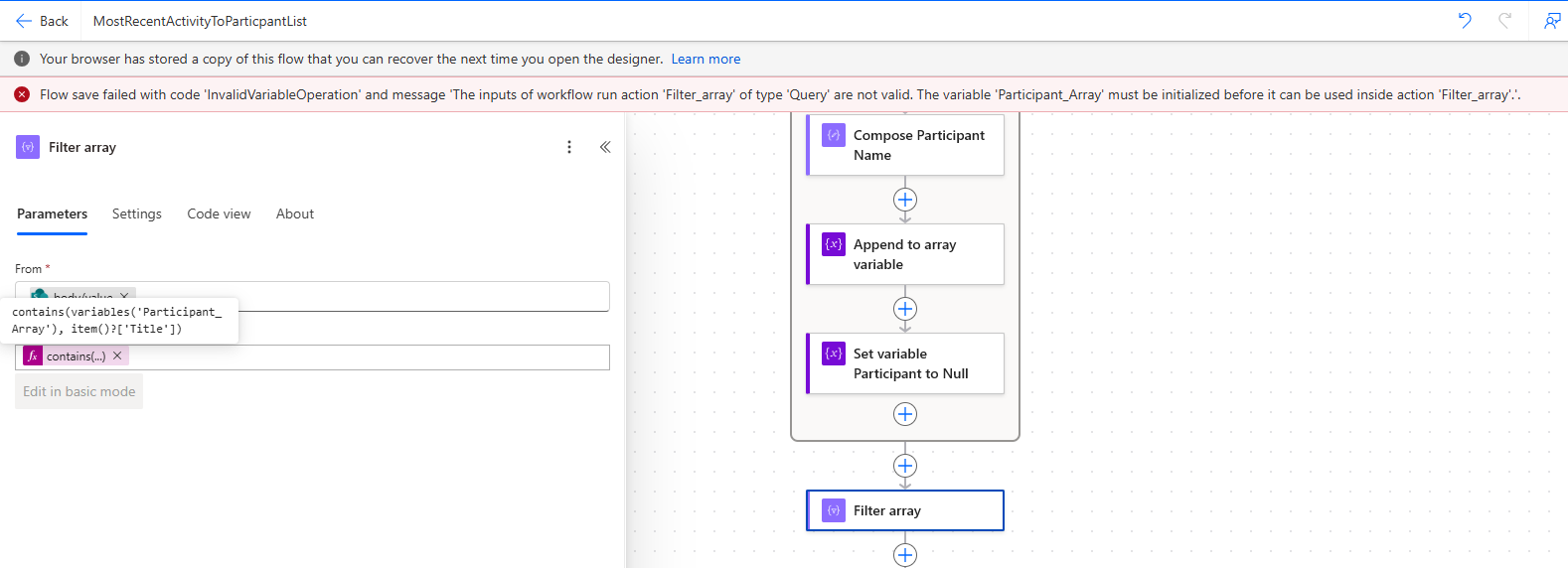
Power Automate flow showing Filter array action with contains() expression, Compose Participant Name, Append to array variable and Set variable steps

Filter array with a contains() expression - processing participant arrays and composing structured output for the tracker pipeline.

Module Configuration

Earlier versions of the scraper used a CSV configuration file to define which modules were included in the tracking process. In the current Dataverse version, module scope is managed through the Activity Tracker Power App, where administrators can add module offerings, mark modules active or inactive, and archive modules without editing configuration files directly.

A key design decision: separating "currently being scraped" from "not archived" ensures historical data is preserved while active tracking scope remains manageable - so completed modules drop out of the active scrape without losing their records.

Suspended Learners

A key data quality issue identified and resolved: suspended learners in Moodle were causing discrepancies between the old and new tracker counts. The new system handles suspended learners more cleanly, excluding them from active learner counts while retaining their data in the model for audit purposes. This distinction is documented explicitly in the system.

Power BI Dashboard

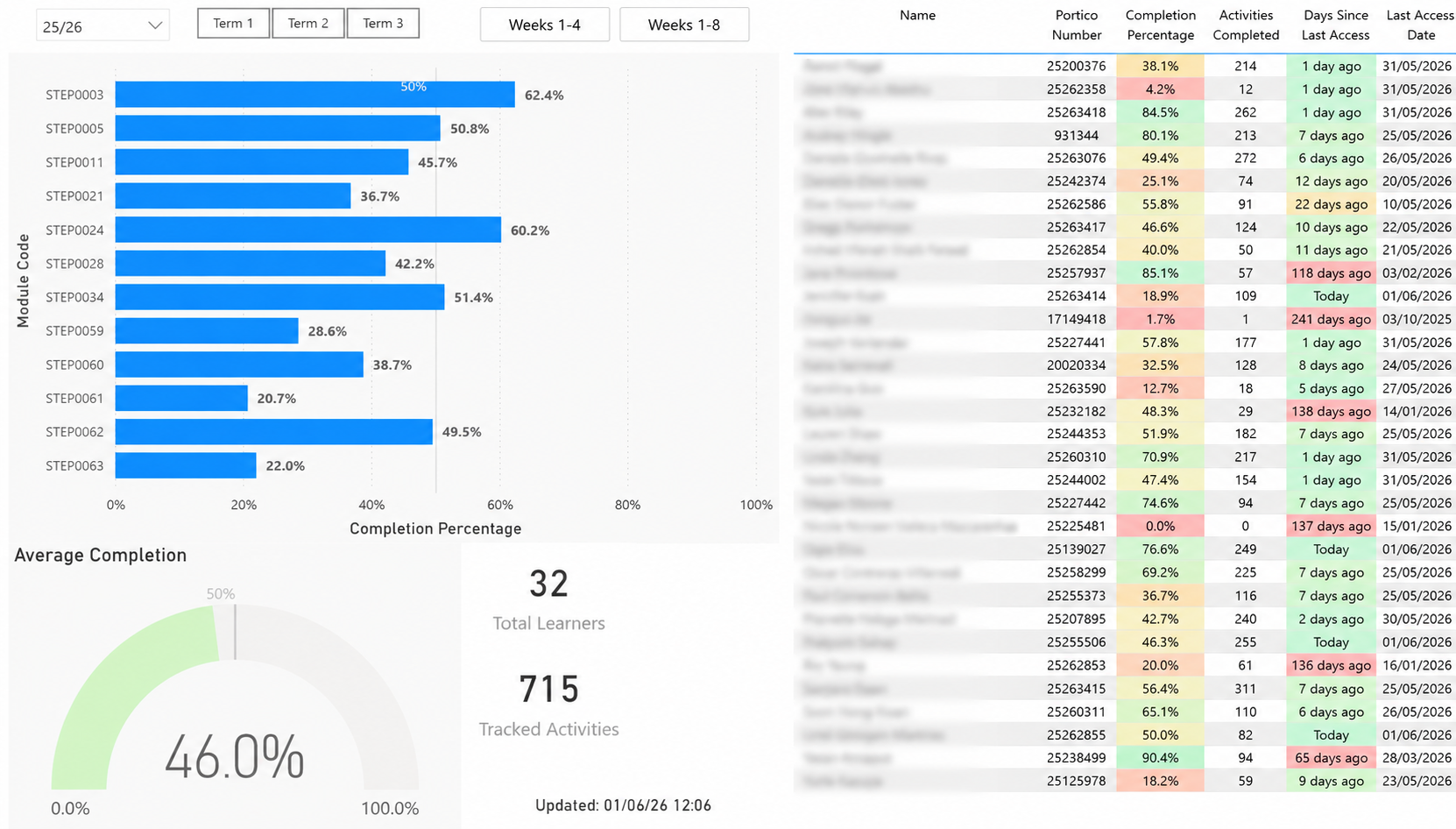
The Power BI dashboard is the user-facing reporting layer, designed for programme teams, module administrators and other staff who need a clear view of engagement without needing to access Moodle directly or interpret raw data exports.

Dashboard Visuals
  • Total and active learner counts by module
  • Completion by module (bar chart, sortable by name or completion %)
  • Completion by learner (filterable by module)
  • Term-based filtering
  • Module-level and learner-level selection
  • Activity type breakdown (Page, Forum, Quiz, Database, Board, etc.)
  • Engagement across weeks
  • Detailed learner/module data tables
Usability Improvements Made
  • Clear visual indicators for learners with 0% completion (where bars would otherwise be invisible)
  • Data labels on visuals where bars are too small to be read without them
  • Default sort by module name with user-overridable sort by completion percentage
  • Annotated screenshots in documentation to explain interaction patterns for non-technical users
Measure Design: A Key Technical Decision

An important Power BI measure issue was identified and corrected. Using a simple count of learners from the activity completion table was insufficient for the headline learner count - because learners who are active but have not completed any activities would be excluded from the count.

The correct approach is to base headline learner counts on the enrolment or active enrolment records, not the activity completion table. This ensures learners with no recorded completion (but who are genuinely enrolled and active) are included in the programme-level totals.

This is an example of where understanding the data model behind the dashboard matters more than knowing how to build visuals - a wrong measure produces a plausible-looking number that quietly misrepresents the truth.

Semantic Model Management

As new academic years, terms and modules are added, the semantic model may need refresh validation, relationship checks and report filter updates. The underlying model is designed so new modules become new records rather than new tables - ensuring the dashboard scales with the programme without requiring structural changes each year.

Model-Driven Power App: Administrative Interface

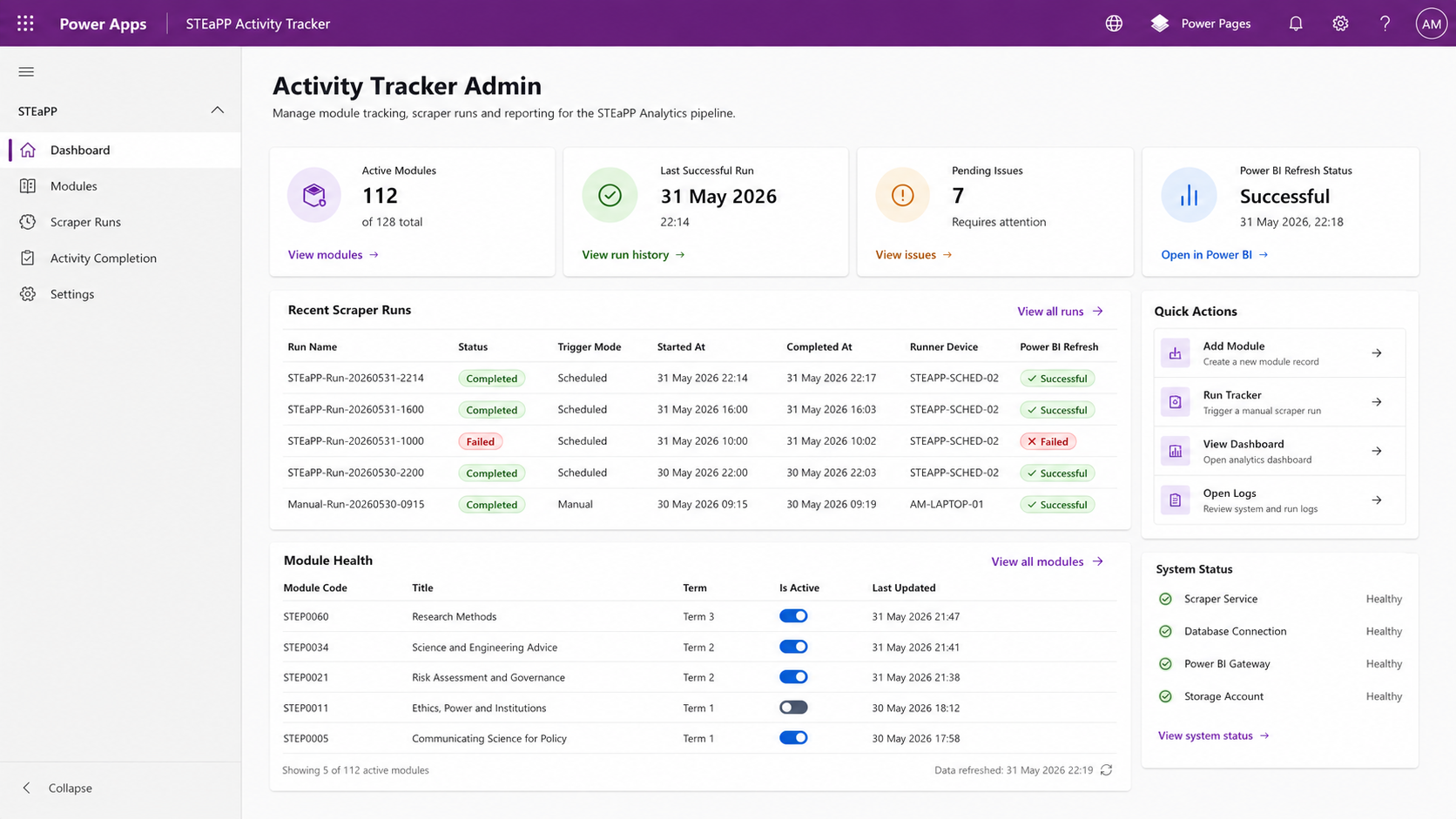
A model-driven Power App provides an administrative interface for managing the tracker without requiring direct access to Dataverse tables. It allows relevant staff to review and manage records through a structured, form-based interface.

What the App Supports
  • Adding and reviewing module offerings
  • Marking which modules are active for scraping (Active Modules view)
  • Managing Moodle course IDs and URLs
  • Reviewing learner and enrolment records
  • Providing a clear admin layer for non-technical users
Model-driven Power App administrative interface for the UCL STEaPP Activity Tracker - showing module management, active module configuration and Dataverse record management

The model-driven Power App admin interface - managing module offerings, active scrape scope and Dataverse records without direct Dataverse access.

Design Decisions

The New Module Offering form was deliberately kept focused - only the fields needed to add a new module (Moodle Course URL, Course ID, Module Code, Academic Year, Term). More technical or auto-populated fields are shown in read-only sections or separate views, to avoid overwhelming non-technical administrators with data they do not need to enter or manage.

Power Platform is used as the single source of truth for module metadata, with a clear separation between "currently being scraped", "not archived" and "historical" - avoiding the confusion that arises when the same concept is managed in multiple places.

Access & Permissions Model

A major thread of the project is working out how access should be managed across the system's components. The intended model is:

  • The Power BI dashboard viewable by a broad audience (to reduce admin overhead)
  • Administrative control restricted through Entra or Power Platform security roles
  • SharePoint used as an access point for embedded dashboard viewing where appropriate
  • Ordinary staff not required to manage Entra groups
An Important Distinction

Adding someone to a SharePoint site may allow access to embedded or linked Power BI content - but only depending on how Power BI sharing, workspace permissions and licences are configured. Being a SharePoint Owner does not automatically mean a user can manage a Power BI dashboard unless they also have the necessary Power BI workspace or report permissions.

This distinction between SharePoint permissions and Power BI permissions is documented clearly in the system documentation, so that staff managing access in future do not accidentally grant or withhold capabilities they do not intend to.

Documentation

A substantial part of the project has been producing documentation so that others can understand, run and maintain the tracker without needing to understand the original build context. The guide covers installation, running the scrape pipelines, the scheduled run configuration, how to manage module scope via the Activity Tracker Power App, how archiving and dashboard refreshes work, and how permissions are structured across SharePoint, Power BI and Power Platform.

It also addresses the less obvious things: what the dashboard does and does not show, known constraints on certain Moodle activity types, how week-scope logic was corrected, and the distinction between "currently being scraped", "not archived" and "historical" - so whoever maintains this next doesn't encounter the same confusion the first build surfaced.

Skills Demonstrated

PowerShell scripting Selenium web automation Dataverse data modelling Power Platform architecture Model-driven app configuration Power BI dashboard development DAX measure design Moodle data extraction Learning analytics design Data pipeline architecture Data cleaning and validation Measure logic and accuracy Permissions and governance Technical documentation Stakeholder reporting Iterative problem diagnosis

For more on the automation infrastructure behind this work, see Workflow Automation & Solution Engineering and Data, Analytics & Reporting.