 Copilot Workflows for Operational Teams
Turning a general AI workshop into three realistic working days for the UCL AI Pathfinders group.
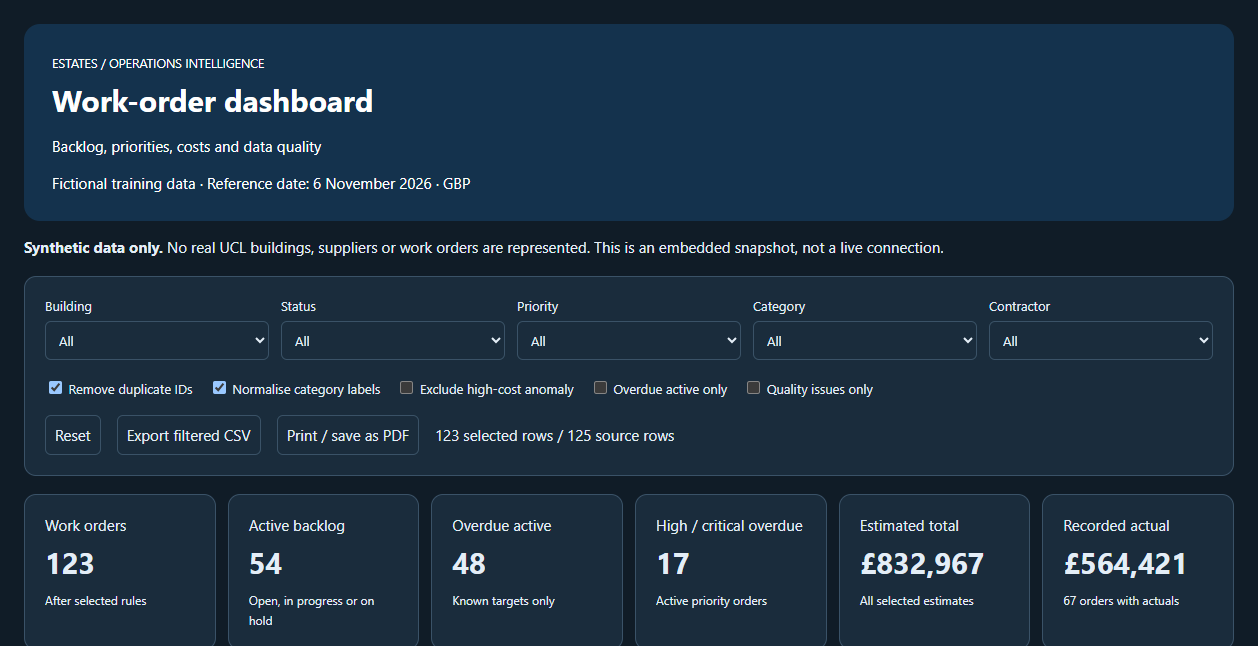
Dashboard produced in the work-order demonstration. All data is fictional.
Microsoft 365 Copilot · Copilot agents · Excel · Teams · AI literacy · Staff development · UCL AI Pathfinders
Microsoft 365 Copilot
 Excel
 Teams
 PowerPoint
The Problem
My workshop Working Smarter with UCL Copilot was written for academic and teaching-administration staff. Its examples are about drafting, searching and summarising. When I was asked to run sessions for the UCL AI Pathfinders group, staff in operational roles, those examples were the wrong fit. They manage buildings, contractors, budgets and backlogs. A demonstration about summarising a reading list would not have told them whether Copilot is useful on a Tuesday afternoon.
So I kept the core of the workshop (what Copilot is at UCL, the difference between the basic and premium licences, how to write a good instruction, where the limits are) and rebuilt every demonstration around operational work.
What I Built
Three demonstration packs, each a small, self-contained set of fictional working documents that I could run live and attendees could reuse afterwards.
1. A source-grounded decision paper
A project proposal, an email of stakeholder concerns, an indicative costs spreadsheet and meeting extracts for a fictional building project. Copilot drafts an options paper into a set template using only those sources, and the group checks each claim back to the document it came from.
2. Meeting to action tracker
A recorded fictional Teams follow-up meeting, clearly labelled as a simulation. Copilot turns the discussion into an action tracker with owners and dates, and we look at what it missed, what it assumed and what a person still has to confirm.
3. Work-order analysis
A workbook of 125 fictional work orders with problems planted in it: missing dates, two duplicated records, inconsistent category labels, one unusually high cost and a completed order with no completion date. Copilot has to find the data-quality issues before it analyses anything.
Checking the Answer Is Part of the Demo
The work-order pack comes with a manual verification list. After Copilot produces its summary, the group verifies one count, one average, one filtered total and one cost comparison by hand, and confirms whether the duplicate records changed the result. The instruction to Copilot says the same thing in plain words: explain each calculation, and do not treat blank or inconsistent values as reliable.
This is the part I care most about. People leave knowing how to get a useful first draft and how to tell whether it is right.
The session also covered reusable agents for repeated tasks, scheduled prompts for a weekly workload review, and an honest account of permissions, licence differences and what Copilot cannot see.
Open the interactive work-order dashboard. It runs in your browser from an embedded snapshot of the fictional data.
What Attendees Said
Comments posted in the session chat as each session closed.
"Really, really helpful … one of the most impactful sessions - thank you!"
"So much knowledge here, will definitely be watching this one back again after."
"That was incredible Richard! Thank you - very helpful!"
"Yes I'm going to watch this back and try to do at the same time. Thanks, lots of information."
"So much content covered!! I will try and rewatch in the hope I can keep up in slower time."
"Thanks Richard! Really useful!"
My Role
I designed the session, wrote the fictional source material, built and tested each demonstration, and delivered both sessions. The dashboard was produced with Copilot from the synthetic workbook: I specified what it should show, checked its figures against the data and refined it until the totals reconciled.
What This Demonstrates
- Adapting training to an audience's actual work instead of re-running a standard deck
- Building safe practice material: realistic enough to be useful, fictional enough to share
- Teaching verification and human review as a normal step in using AI
- Moving from single prompts to repeatable workflows, agents and scheduled prompts
Related work: Speaking and workshop record · AI adoption at UCL · Interactive demos · Copilot Studio governance