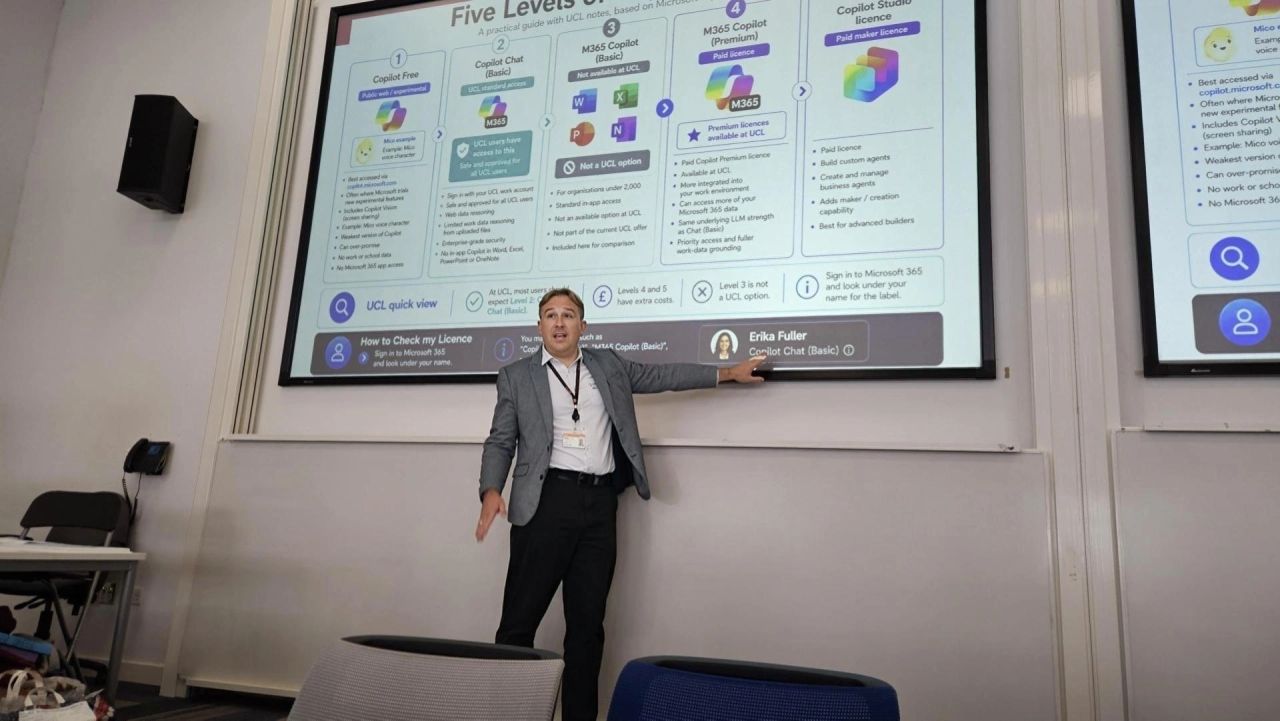
I designed this hands-on Microsoft Copilot workshop and I run it across UCL. More than 1,000 people have taken part so far, from department teams and away days to UCL's central staff training programme.
Explaining which version of Copilot each person has, in front of the licence overview.
1,000+people trained
12+sessions delivered
7UCL audiences
5dates booked for 2027
What the workshop covers
A 60-minute session for complete beginners and for people who have already started using Copilot. It explains which version of Copilot each person has at UCL, then shows it working on real tasks.
Copilot access at UCL. The different licence levels and what each one offers, using my Four Levels of Copilot Access guide.
Prompts that work. A simple framework: goal, context, expectations and source.
Everyday tasks. Drafting, summarising, searching and analysing, demonstrated live.
Responsible use. Ethics, privacy, data protection and checking what Copilot produces before you rely on it.
AI agents. What an agent is, and how to build a simple one for a task you repeat.
How it grew
I'm not surprised this has taken off in such a big way. I spent many years crafting my presentation and verbal engagement techniques in the classroom, in front of children and young people, who have the shortest attention spans and need the greatest motivation to engage. I know I am an accomplished, professional and highly engaging presenter, and I can explain the most complex concepts in the most grounded ways.
The demand for the training, which began with me simply explaining the ins and outs of Copilot to my colleagues, has grown and grown: first the Teaching and Learning Forum, then UCL's main Digital Education catalogue, 'Essential Skills for Digital Success'. I have now delivered the course to more than 1,000 people at UCL, a sizeable slice of the workforce of this huge university, as well as at conferences, away days and AI Pathfinder seminars. I am now delivering an advanced version to meet the growing needs of people across UCL.
When I deliver training, I take on board people's needs and differentiate the learning, building on their preconceptions and confidence levels. I can sniff out how people's needs are developing, and shape the training so they get what they need to advance their own skills, with AI or any other digital tool.
Who it has reached
It began as a session for colleagues in my own department in January 2025. Word spread from there, and it now runs as part of UCL's central staff training.
January 2025 UCL STEaPP department staff: the first delivery
2025 UCL STEaPP, extended to a faculty-wide audience
2025 UCL Teaching and Learning Forum
July 2025 UCL Teaching Administrators Conference
June 2026 UCL Primary Care and Population Health Away Day (invited session)
July 2026 UCL Teaching Administrators Conference (invited back)
Oct to Nov 2026 UCL Digital Skills Development, in the 'Essential Skills for Digital Success' programme: four online sessions open to all UCL staff, fully booked, with extra dates added
November 2026 UCL AI Pathfinders: sessions tailored for operational teams, and a session for Microsoft 365 Copilot Premium users
Presenting at the UCL Primary Care and Population Health Away Day, June 2026.
Versions for different teams
Operational teams: UCL AI Pathfinders
My usual examples are about drafting, searching and summarising, which suits academic and administrative staff. The AI Pathfinders group manage buildings, contractors, budgets and backlogs. A demonstration about summarising a reading list would not have told them whether Copilot is useful on a Tuesday afternoon. So I kept the core of the workshop and rebuilt every demonstration around their work:
A source-grounded decision paper. Copilot drafts an options paper from a proposal, stakeholder emails and a costs sheet, and the group checks each claim back to its source.
Meeting to action tracker. A fictional Teams meeting becomes an action tracker with owners and dates, and we look at what Copilot missed or assumed.
Work-order analysis. 125 fictional work orders with planted data-quality problems. Copilot has to find them before it analyses anything, and the group checks the totals by hand.
Checking the answer is part of the demo. This is the part I care most about: people leave knowing how to get a useful first draft, and how to tell whether it is right.
For colleagues with a Microsoft 365 Copilot Premium licence. It covers what the extra licence adds: Copilot working with your own emails, files, meetings and chats inside Word, Excel, Outlook and Teams, and where that makes a real difference to everyday work.
I first ran this content for the UCL AI Pathfinders group. From March 2027 it becomes a regular advanced session in UCL's central programme.
2027 dates
Five new dates through UCL Digital Skills Development, open to UCL staff:
Wednesday 27 January 2027, 13:00 to 14:00
Tuesday 9 February 2027, 15:00 to 16:00
Thursday 18 February 2027, 12:00 to 13:00
Thursday 25 February 2027, 10:00 to 11:00
Wednesday 10 March 2027, 13:00 to 14:30: advanced session for Microsoft 365 Copilot Premium users
"Richard delivered tailored Copilot training for our AI Pathfinders programme and adapted the content well to the needs of the group. He has a strong understanding of Microsoft 365 Copilot and was able to explain both the practical opportunities and some of the more complex issues clearly. The sessions were engaging, relevant and very well received."
"Really, really helpful... one of the most impactful sessions - thank you!"
"Brilliant and entertaining session with practical advice on how to use Copilot for work. I think it will make my life easier and reduce my workload."
"Very helpful and illuminating."
"Clear and perfectly pitched."
Evidence and limits. The 1,000+ figure is my running total of attendees across all deliveries since January 2025. The session deck, the demonstration packs and the Four Levels guide exist as working files. Comments come from session chats and feedback and are shown without names, except for public recommendations.
A session for your team
I run versions of this workshop for other organisations too, built around your team's own tasks and licences. Any length, online or in person.