 UDL Module Review Platform
A repeatable, evidence-led way to review modules against Universal Design for Learning guidelines.
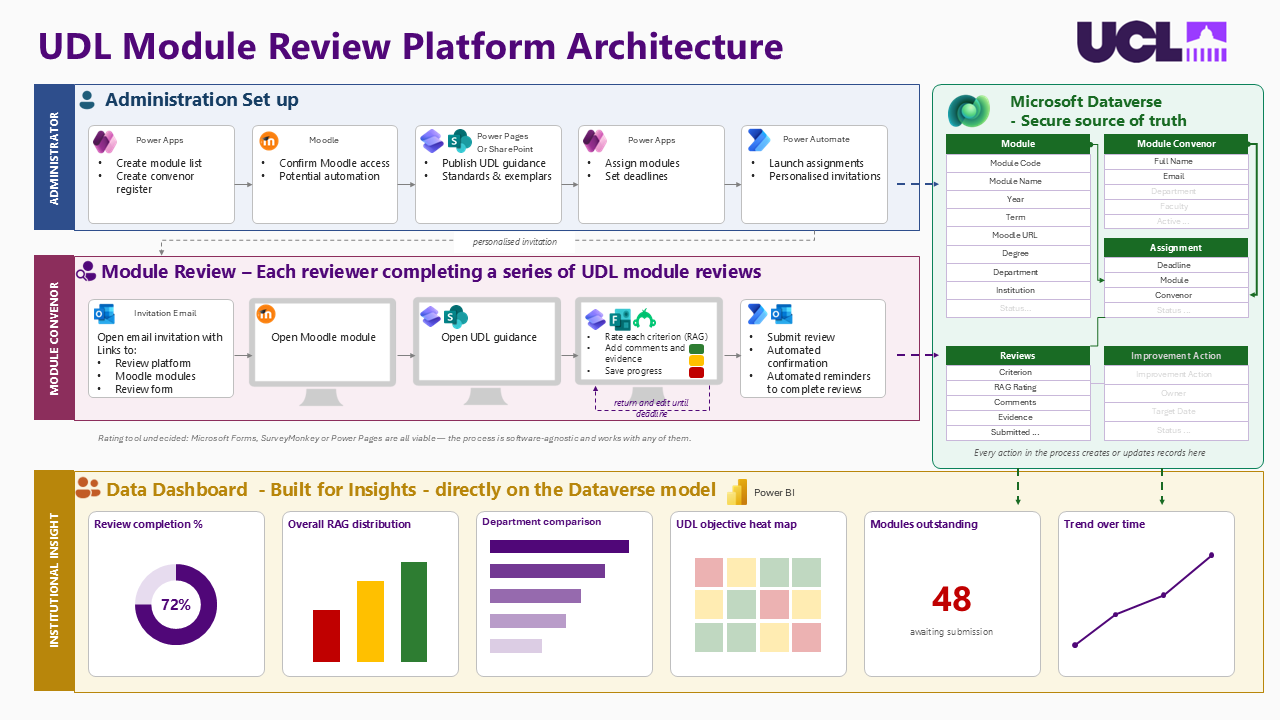
Process map for the service. Dashboard figures in the map are illustrative.
Dataverse · Power Pages · Power Apps · Power Automate · Power BI · Moodle · Universal Design for Learning · Service design
 Dataverse
 Power Pages
 Power Apps
 Power Automate
 Power BI
 Moodle
The Problem
Universal Design for Learning (UDL) asks module teams to build inclusion in from the start: more than one way to take in information, to take part and to show learning. Colleagues leading UDL work at UCL had a sound paper process for this. A module convenor rates their module against the guidelines before it runs, agrees actions, then rates it again at the end.
On paper, that process is hard to run at scale. Someone has to know which modules are due, who is reviewing them, which reviews are late and what was promised last time. And nobody can see the overall picture: which guidelines are consistently strong, and where departments need support.
The Design
I mapped the review as a service with three audiences, and one data model underneath all of them.
The process map I produced to explain the service to colleagues. The percentages and counts in the dashboard lane are placeholders that show the kind of view intended.
Administrators
Keep the module list and convenor register, publish the guidance and exemplars, assign modules, set deadlines and launch personalised invitations.
Module convenors
Open one email with links to the module, the guidance and the review. Rate each criterion red, amber or green, add comments and evidence, save progress and return to it until the deadline. Confirmation and reminders are automatic.
The institution
A Power BI view built directly on the review data: completion, the spread of ratings, comparison across departments, a heat map by UDL guideline, and change over time.
One Data Model, Not Many Spreadsheets
Every step in the process creates or updates a record in Microsoft Dataverse. Five tables carry the service: Module, Module Convenor, Assignment (who reviews what, by when), Review (a rating, comment and evidence for each criterion) and Improvement Action (owner, target date, status).
That choice is what makes the rest possible. Reminders can be driven by assignment status. A second review of the same module can be compared with the first. Reporting needs no manual collation. And access can be controlled properly, which matters because reviews contain candid self-assessment.
Decisions I had to work through
- The rating tool. Microsoft Forms, SurveyMonkey and Power Pages could each collect a review. I designed the process so it did not depend on the choice, then prototyped the reviewer journey in Power Pages because it lets a convenor save and return to a review tied to their own assignment.
- Environment and ownership. The service needs its own Power Platform environment, licensing that covers reviewers, and an owner who is not me. I raised these early so that a working prototype does not become an unsupported system.
- Tone. The review is developmental. The reporting is designed to show where support is needed, with no league table of individuals.
My Role
I designed the service and data model, produced the process map and a narrated video explaining it to colleagues, and built and tested the core Dataverse tables and Power Pages components. The UDL framework, the review criteria and the action-plan approach belong to the colleagues who lead this work. My contribution is turning their process into something that can run repeatedly and report on itself.
What This Demonstrates
- Service design: starting from the people and the process, then choosing technology
- Relational data modelling in Dataverse for a workflow that repeats every year
- Power Pages for external-style access without giving reviewers the admin tools
- Planning for ownership, licensing and handover before launch
Related work: STEaPP Activity Tracker · Power Platform · AI accessibility agent · Digital education at UCL